One click.
Every account.
RAMMIT saves your Roblox accounts and opens a separate Roblox window for each one you tick. Free and open source, for Windows 10 and 11.
RAMMIT-Setup.exe installs, updates and removes it. Rather not use an installer? Get the zip and checksums.
How it works
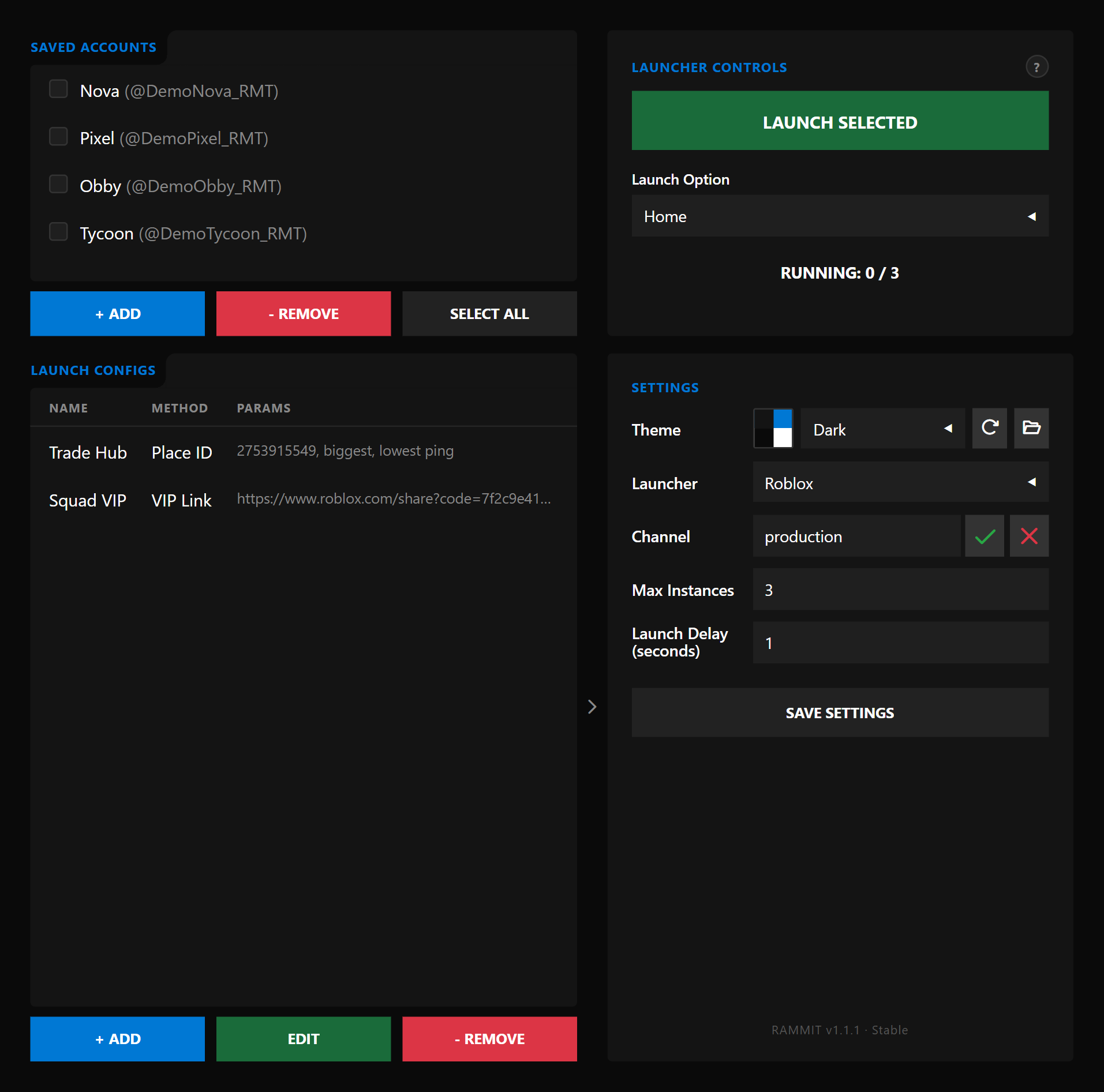
Switching alts by hand means logging out and back in for every account. RAMMIT keeps them all signed in and opens them together.
-
1
Add each account once with + Add. They're listed as Display Name (@username).
-
2
Tick the ones you want. Click a row, Shift-click for a range, or press Select all.
-
3
Press Launch 3 selected. A Roblox window opens for each account, RUNNING counts them up, and you can cancel halfway.
Launch options
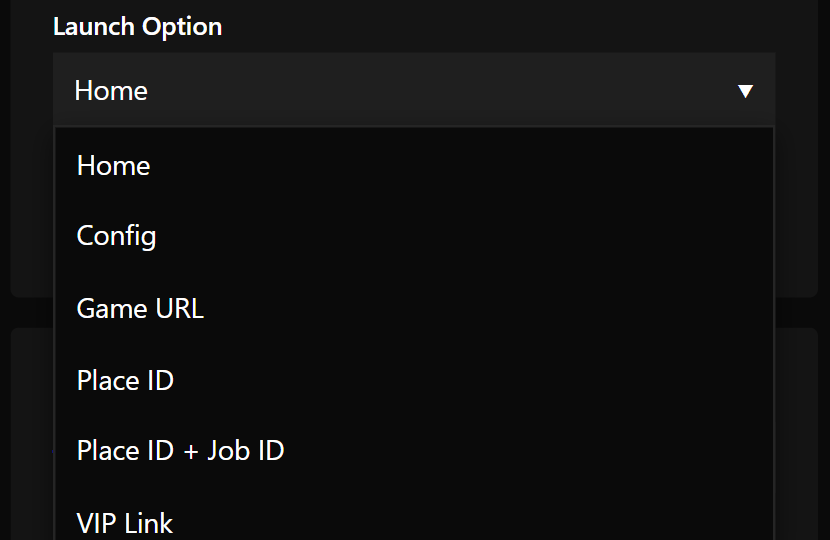
Choose where every ticked account goes.
Picking the server
With a Game URL or Place ID, RAMMIT can pick the server for you instead of leaving it to Roblox.
- Players
- Smallest server, biggest server that isn't full, a minimum, a maximum, or a range.
- Ping
- Lowest or highest.
Settings
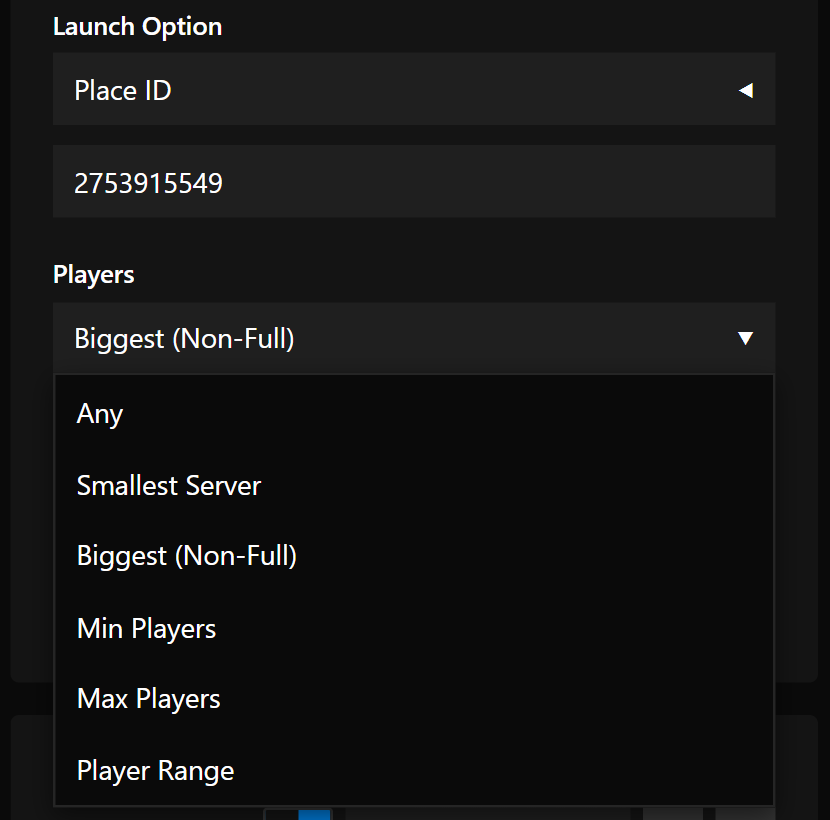
Everything else lives in one panel.
Dark, 2016 Roblox or CBlock, or make your own.
Roblox, Bloxstrap or Fishstrap.
Which Roblox channel to launch on.
How many Roblox windows can run at once.
The gap between each window opening.
New to it? A short guided tour runs the first time you open RAMMIT.
Launch film
FAQ
Is it free?
Yes. RAMMIT is free and open source under the GPL-3.0. The code, every release and its SHA-256 checksum are on GitHub.
What do I need to run it?
Windows 10 or 11. Run RAMMIT-Setup.exe, or unzip the release and run RAMMIT.exe. You don't need Python.
Where are my accounts stored?
Only on your own PC, in the Config folder next to RAMMIT.exe (with the installer, that's %LOCALAPPDATA%\RAMMIT). Each account's login cookie is encrypted with Windows DPAPI, so only your Windows user can read it. Usernames, display names and settings are stored as plain text. Nothing is sent to us: RAMMIT only talks to Roblox.
What happens to my accounts when I uninstall?
By default the uninstaller keeps your Config folder and its backups, so a reinstall picks up where you left off. Tick Uninstall Config/ folder too to delete them. If you used the zip, delete the RAMMIT folder.
Does it work with Bloxstrap or Fishstrap?
Yes. Pick Roblox, Bloxstrap or Fishstrap as the launcher in Settings.
Does it farm, auto-play or run scripts?
No. RAMMIT only opens official Roblox clients, one per account. What you do in them is up to you.
Is RAMMIT made by Roblox?
No. RAMMIT is an independent project, not affiliated with, sponsored or endorsed by Roblox Corporation.
Can using it get my account banned?
RAMMIT only opens the official Roblox client, but Roblox's own rules decide what is allowed, and they can change. We can't promise any account is safe. Read the Software Disclaimer before you use it.

Get RAMMIT
Latest release · Windows 10 / 11 · free · release notes, zip and checksums